
Dungeon Picnic Guides Hub
Route every demo run from install through shared mana, shards, and mapless events.
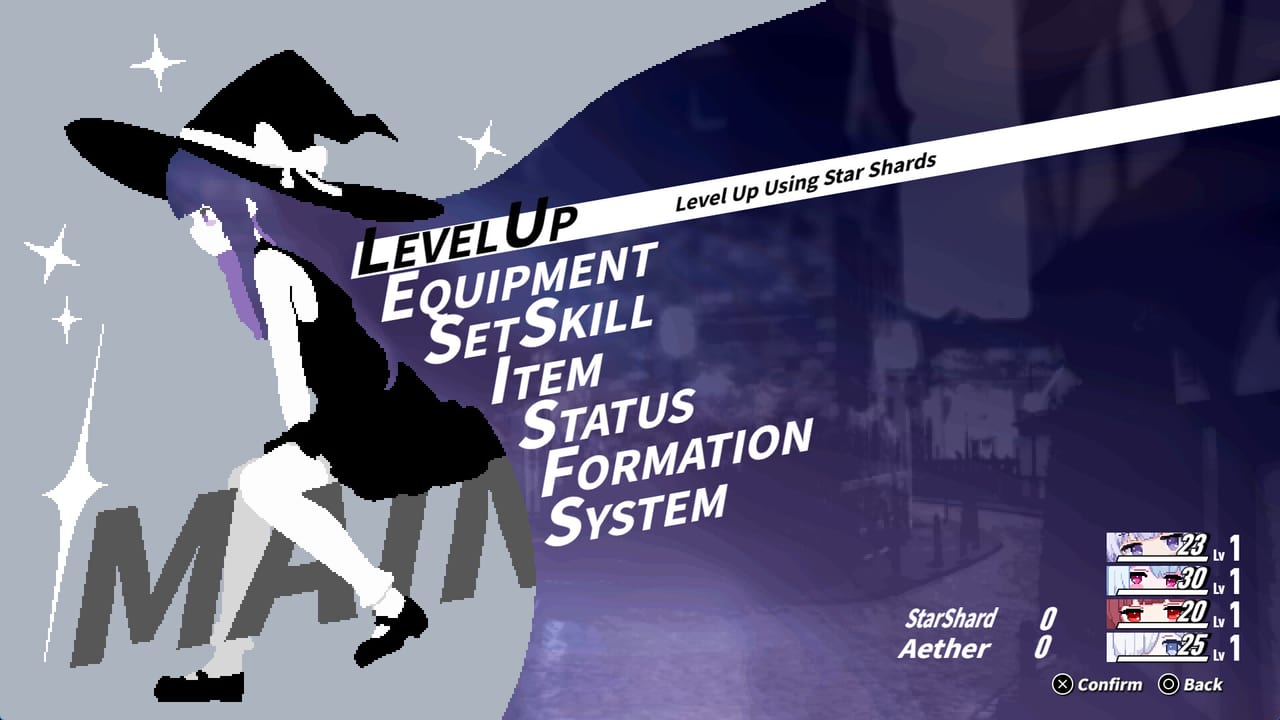
Dungeon Picnic is a single-player party-building roguelike RPG from solo developer Lapismine. The full product version is still to be announced. A limited-time demo of the first area began distribution on 6 September 2026, with four playable heroines, and that demo is the practical starting point for every page in this hub. These guides exist so you can leave a run, look up one system, and return without rereading store-page copy.
Treat this hub as a map, not a spoiler novel. Use it when you need a specific answer: how shared Mana works, why a Break granted an extra turn, which menu spends Star Shards, or whether demo save data will carry forward (it will not). Each article below is a standalone briefing with cross-links into the character roster, the early character ranking, and the tools pages.
What these guides assume
You do not need prior Lapismine titles. You do need a Windows PC that meets the system requirements: Windows 11, an Intel Core i3 class CPU, 8 GB RAM, OpenGL with 1 GB VRAM, and about 1 GB of storage. A gamepad is recommended. Keyboard-only play is supported, controller support is partial, and the mouse wheel works in lists. Steam lists English, Japanese, and Simplified Chinese in the client; this wiki is English here, with Japanese on the language switcher.
The combat model is unusual even if you know command RPGs. There is no per-character MP bar. The party shares one Mana (MN) pool. Hitting a weakness inflicts Break, which grants an extra turn called ReAct, improves mana recovery, lowers mana costs, and makes attacks against the broken foe more likely to crit. Enemies can ReAct as well. Combo follow-ups and counters ignore ordinary turn order. Skills use cooldowns. Astrologia’s Unlimited Meteor is the extreme example: it spends 2 MN, rolls hits from your ready skills, then puts every skill on cooldown. Read that loop in the ReAct combat guide before you spend shards on flashy options.
Exploration is mapless. You choose labeled events such as enemy nodes that promise battle plus rewards, and a counter in the vein of 00/10 tracks how far the current stretch has gone. Currencies split into StarShard for the Level Up screen and Aether for other sinks. A wipe strips skills and equipment; the next run randomizes what you find. Those rules are why party theory and route theory are separate articles.
Start here if you have not played
If the Steam client is still downloading, open Getting Started first. That page walks the install, the first menu (Level Up, Equipment, Set Skill, Item, Status, Formation, System), the four demo heroines, and the wipe. Pair it with the limited demo guide so you do not plan around save transfer or around roster members who are not in the demo party.
The demo party is Astrologia, Apothecary, Kannagi, and Aries Knight. Other names on equipment and status screens, including Harvester and Samurai, are roster knowledge for later planning, not extra demo slots. Wishlist tracking lives on the wishlist page. Dates and patch notes live under updates, including the demo distribution notes, Steam Next Fest from 19 October 2026, and development comments from Lapismine.
Combat and party pages
After one fight, most questions are combat questions. The combat guide covers shared MN, Break, ReAct, enemy extra turns, crits on broken targets, skill cooldowns, and why Unlimited Meteor is a reset rather than a default opener. Confirmed skill identities from screenshots and posts are collected on the skills ranking so this hub does not invent names.
Party construction is a four-slot problem with a shared resource. The party-building guide explains Star Shard costs on the Level Up screen (characters cost 1, Starting Mana costs 3, with values such as SHARD 03 showing on options), Set Skill, Formation, and how Apothecary heals interact with Astrologia’s comet kit. Use the party planner as a scratch pad, then confirm flavor and passives on each character page.
Exploration, controls, and official links
The exploration guide is about event selection, the 00/10 style counter, enemy nodes, and the rest-versus-rush bet. Open it when you are staring at EVENT ENEMY ????? and do not know whether Battle + Rewards is worth the HP. The controls guide maps gamepad prompts from the current build: X for Confirm / Get / Level Up / Select Slot, Circle for Back / Toggle Details, Square for Toggle Details, Triangle for AutoEquip, L1 for Item / Switch Characters, R1 for Switch Characters, and OPTIONS for Status Effects / Unequip All / Menu.
Official storefront and social links sit on the links page: Steam app 3736800, X @Lapismine_game, YouTube @Lapismine_game, and Ci-en. Lapismine has disclosed that some characters were designed with AI assistance and then created by the developer; that is a production note, not a gameplay stat.
Menus, rest, preview, and streaming
After the first-hour loop, most remaining questions are menu questions. The level-up guide covers Star Shards, random skill picks, and why Starting Mana costs more than a character rank. The equipment guide covers Set Equipment, the Artifact slot, and First Star Fragment. The rest screen guide is the pause-between-fights briefing; skill breakdown and alchemy stay labeled as developer-shown possibilities, not a recipe list. If you are recording the demo, the streaming guide lists the 6 September 2026 rules. For a systems roundup without a purchase date, use the preview.
Between wipes, treat this hub as a routing table
A useful demo habit is to park one combat question and one route question after each wipe, then return here instead of scrolling a single mega-article. If the last fight died to mana starvation, open combat. If Star Shards went into the wrong Level Up option, open party building. If the equipment screen’s face buttons still feel like a foreign layout, open controls. The full game remains upcoming; these pages track the limited demo and the systems Lapismine has already shown, and they stay useful when you treat this hub as a switchboard rather than a chapter you reread from the first line after every picnic.
Frequently Asked Questions
Quick answers for demo runs, ReAct combat, and party building.
Which Dungeon Picnic guide should I open first?
New players should start with Getting Started, then the limited demo guide and controls. If you already know command RPGs, skip ahead to ReAct combat and party building.
Is the full game ready to buy as a complete product?
No. The product version is still to be announced. What you can play now is the limited-time demo of the first area with four characters. Track dates on the demo launch notes and Steam Next Fest pages.
Does Dungeon Picnic support cooperative play?
Steam lists the game as single-player only. Party building happens inside one run, not with other people. Plan teams on the party planner and the character roster.
Where do official links and hardware specs live?
Use the links hub for Steam, X, YouTube, and Ci-en. Confirm Windows 11, memory, and GPU needs on system requirements before you install.
Where are Star Shards, gear, rest, and streaming rules?
Open the level-up guide, equipment guide, rest screen, and streaming guide. A systems recap lives on the preview.