
How to Play Dungeon Picnic
From Steam install to your first shared-mana fight, shard spend, and wipe.
Dungeon Picnic looks like a bright picnic and plays like a strict party-building roguelike RPG. You pick four heroines, share one Mana pool, and push through mapless events until a wipe strips the kit you assembled. This page is the zero-to-first-run briefing: storefront, hardware, first menus, the demo party, shared mana, and what a wipe actually deletes. The full product version is still to be announced; everything here is written against the limited demo of the first area and the systems Lapismine has shown on Steam.
If you only have time for one extra article after this one, read the limited demo guide so you do not plan around save transfer. If you already installed and died to a Break you did not understand, jump to ReAct combat.
Steam, hardware, and input
The game is Steam app 3736800 from developer and publisher Lapismine, a solo Japanese indie. Open the Steam store page to wishlist the upcoming product version and to find the limited demo (demo app 5207170). Confirm the system requirements before you download: Windows 11, an Intel Core i3 class CPU, 8 GB RAM, OpenGL with 1 GB VRAM, and about 1 GB of storage.
A gamepad is recommended. Keyboard-only play is an option, controller support is partial, and the mouse wheel is supported in lists. Face-button labels in the current build are documented on the controls guide. Steam lists English, Japanese, and Simplified Chinese for interface and subtitles. This wiki is written in English on this page; use the language switcher for Japanese.
Official channels sit on the links hub: X @Lapismine_game, YouTube @Lapismine_game, and Ci-en. Wishlist reminders live on the wishlist page. Lapismine has said some characters were designed with AI assistance and then created by the developer. That disclosure does not change combat math; it is background for how the roster was made.
Your first session
Install the limited demo, then treat the opening minutes as a systems tour rather than a score chase. The demo covers the first area with four characters: Astrologia, Apothecary, Kannagi, and Aries Knight. Other names you may see on equipment or status screens, such as Harvester and Samurai, are roster entries for later study, not extra demo party slots.
The field is mapless. You choose events, including enemy nodes labeled in the spirit of EVENT ENEMY ????? with Battle + Rewards. A counter such as 00/10 shows how much of the current stretch you have cleared. That loop is covered in the exploration guide. Do not expect a traditional dungeon floor plan; the skill is picking which labeled risk to take with the HP and mana you still have.
Open the menu early so the labels stick. You will see Level Up (this is where Star Shards are spent), Equipment, Set Skill, Item, Status, Formation, and System. Level Up presents random skills and options with costs: characters cost 1, Starting Mana costs 3, and individual rows can show values such as SHARD 03. Spend slowly on the first run. The party-building guide explains why Starting Mana is expensive relative to a character pick, and the party planner is the scratch pad for later attempts.
Shared mana, not four MP bars
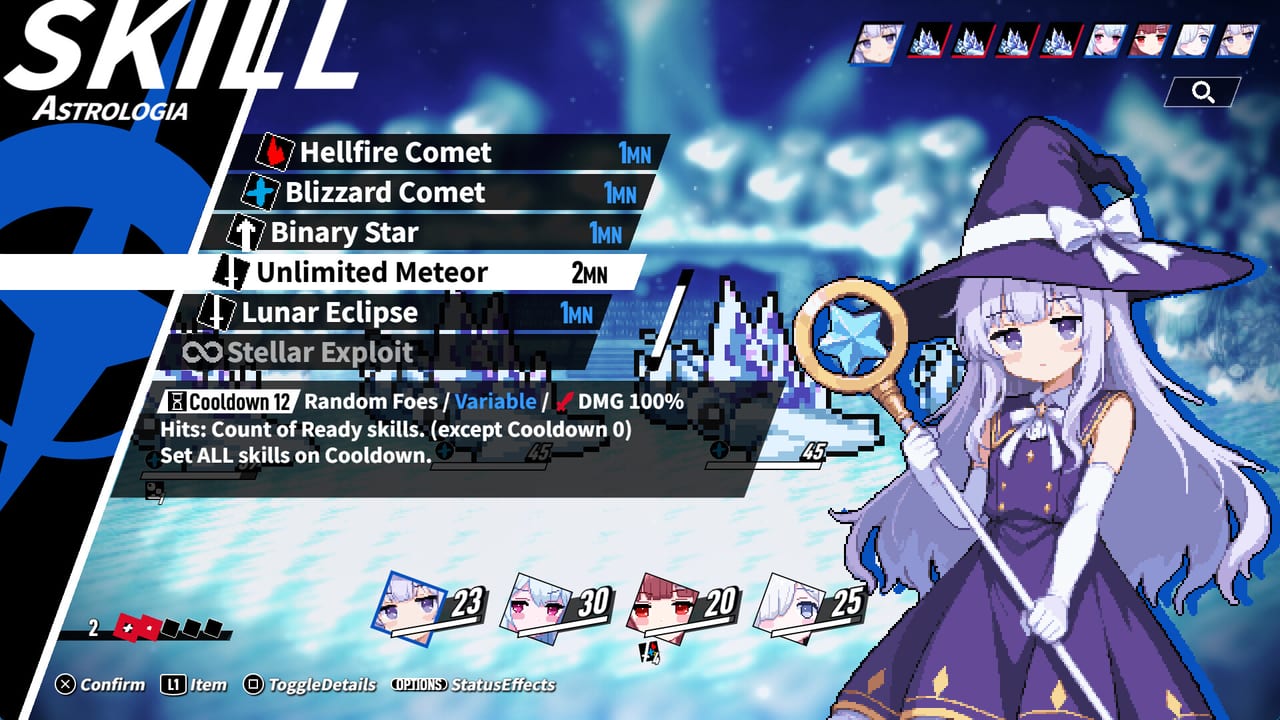
Combat will punish the habit of treating each heroine as her own caster. The party shares one Mana (MN) pool. A 1 MN comet from Astrologia and a 2 MN heal from Apothecary draw from the same tank. Hitting a weakness inflicts Break, which grants an extra turn (ReAct), improves mana recovery, reduces mana costs, and raises crit chance when you attack the broken foe. Enemies can ReAct too. Combo follow-ups and counters ignore ordinary turn order. Skills have cooldowns. Unlimited Meteor is the loud exception: 2 MN, cooldown 12, random foes, and it sets all skills on cooldown after rolling hits from ready skills.
Astrologia’s confirmed kit from screenshots includes Hellfire Comet (1 MN), Blizzard Comet (1 MN), Binary Star (1 MN), Unlimited Meteor (2 MN), Lunar Eclipse (1 MN), and Stellar Exploit with an infinity icon. Official posts also describe cooldown reduction on Break. Apothecary shows Counter Heal (2 MN, cooldown 6, all allies, Heal.ELM, heal 50%), Heal All (2 MN), and Poison Injection (1 MN). Kannagi is a fox-eared shrine maiden from a mystical clan who uses a purification wooden sword against evil gods; Aries Knight appears in press coverage with a maid-knight look. Do not invent extra skill names for them. Put the numbers together on the combat guide and the skills ranking.
Formation still matters because speed and who acts first change how you spend the shared pool. Samurai’s shown artifact First Star Fragment is a legendary piece with SPD +25% and the line that the wearer can act first when battle begins. That is roster knowledge, not a promise that the demo will hand it to you. Early rankings live on the character ranking if you want a second opinion after one wipe.
Wipes, currencies, and the second run
StarShard is the level-up currency. Aether is the other purse you will see on the route. They are not interchangeable, so do not dump every pickup into the first shiny Level Up row. When you wipe, you lose skills and equipment, and the next run randomizes finds. That is the roguelike contract: the four heroines return, the kit does not. Plan the second attempt around one lesson (mana starvation, a skipped heal, a greedy enemy node) instead of rebuilding the same loadout from memory.
The limited demo’s save data does not transfer to the product version. Streaming and monetization of demo play are allowed. File bug reports on Steam discussions rather than burying them in a chat screenshot. Steam Next Fest begins 19 October 2026; use that window as a second look, not as a save-migration date. Calendar context is on demo launch notes, Steam Next Fest, and development.
A first-run checklist that survives a wipe
Confirm Windows 11 and 8 GB RAM, then install the demo from Steam. Bind the gamepad if you have one, and skim controls so Triangle AutoEquip is a conscious choice. In the first fights, spend MN on 1-cost comets and a planned heal instead of opening with Unlimited Meteor. Break a weakness, take the extra turn, and watch recovery tick up. On the route, treat 00/10 as a budget, not a completion sticker. Spend Star Shards on a character option or Starting Mana only after you know which hole in the shared pool you are filling.
When that first picnic ends, do not treat the wipe as a failed exam. It is tuition. Open this page’s sister articles for the hole that actually killed you, then start the next run with one rule you did not have before: a mana floor, a node skip, or a Set Skill slot you refuse to leave empty.
Frequently Asked Questions
Quick answers for demo runs, ReAct combat, and party building.
What do I need before I install the demo?
A Windows 11 PC with about 8 GB RAM, 1 GB VRAM via OpenGL, and 1 GB of storage. Read the full list on system requirements, then install from the [Steam store page](https://store.steampowered.com/app/3736800/Dungeon_Picnic/).
Who is in the first playable party?
The demo uses four heroines: Astrologia, Apothecary, Kannagi, and Aries Knight. Harvester and Samurai appear in roster material, not as extra demo slots.
What happens when I wipe?
You lose skills and equipment, and the next run randomizes finds. Star Shards spent on Level Up do not rebuild the same kit automatically. Use party building to plan the next spend, and exploration to take fewer greedy nodes.
Will my demo save carry into the full game?
No. Demo save data does not transfer to the product version, which is still to be announced. Rules, streaming notes, and the Next Fest window are collected in the demo guide.
Is Dungeon Picnic single-player?
Yes. Steam lists it as single-player only. You build a party of four inside one run. There is no cooperative mode to invite. Team ideas belong on the party planner.